Juggling multiple access codes can be a hassle, especially during emergencies or when staff need quick entry to multiple units. Imagine the hassle of searching for the right code when a maintenance issue arises or when housekeeping needs to access several rooms in a hurry. Akia’s Device Management: Master Codes feature allows properties to configure master codes that remain active across one or multiple devices. Master codes sit on top of the same keyless entry setup your guests use.
- Emergency maintenance - When guests request urgent assistance, the maintenance team can quickly access the affected room using the master code, reducing delays.
- Housekeeping efficiency - Housekeeping staff need to clean multiple rooms and can quickly access all of them without juggling physical keys and multiple codes.
- Last minute room changes - If a guest wants to change rooms due to a disturbance, you can immediately send the master code, reducing wait time.
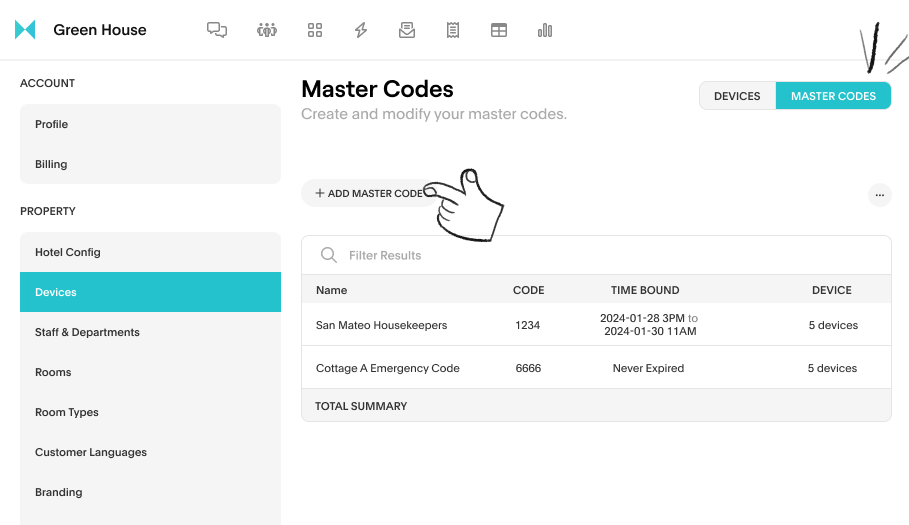
How to create master code in Akia:
- Click on your profile on the top right. In the drop down, click on Settings.
- On the left column under Property, click Devices.
- On the left where it has options for Device or Master Codes, toggle to Master Codes.
- Click Add Master Code, and continue setting up the master code.